
Software Service Invoice Template
Free invoice templates for software service providers, SaaS companies, software developers, IT consultants, app development teams, software support businesses, and digital service agencies. Download and edit in PDF, Word, Excel, Google Docs, or Google Sheets.
Use this template to bill for software development, SaaS subscriptions, setup fees, maintenance, technical support, bug fixes, custom features, licensing, hosting, taxes, discounts, deposits, and payment terms in a clear and professional way.
Download the App
Create, send and manage invoices on the go.


Download Free Software Service Invoice Templates
Download a template, then edit it in PDF, Word, Excel, Google Docs, or Google Sheets. Print it, save it, or send it to your client when the software service is complete or when a billing period ends.
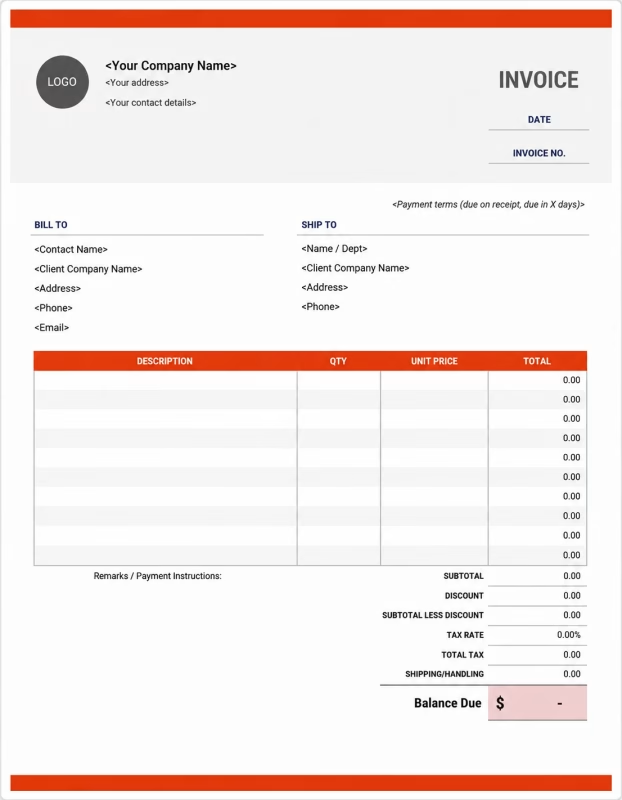


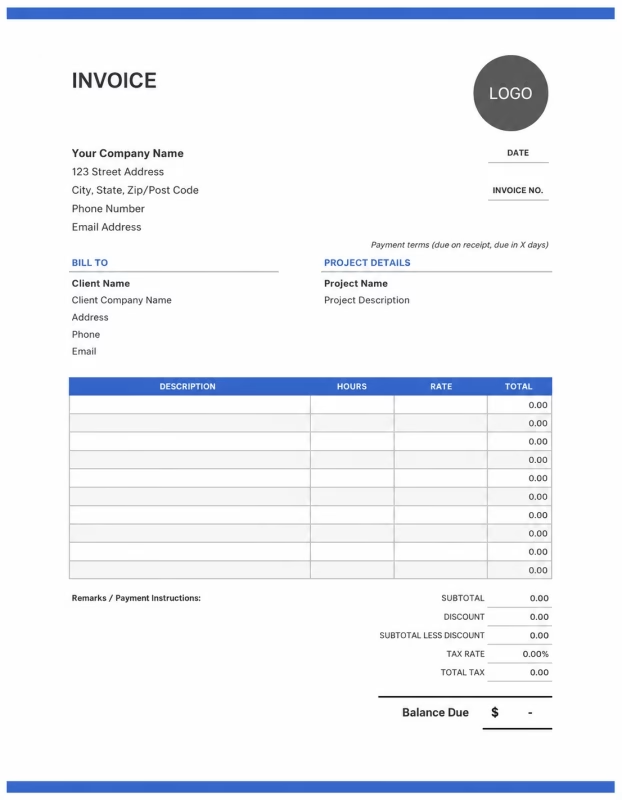
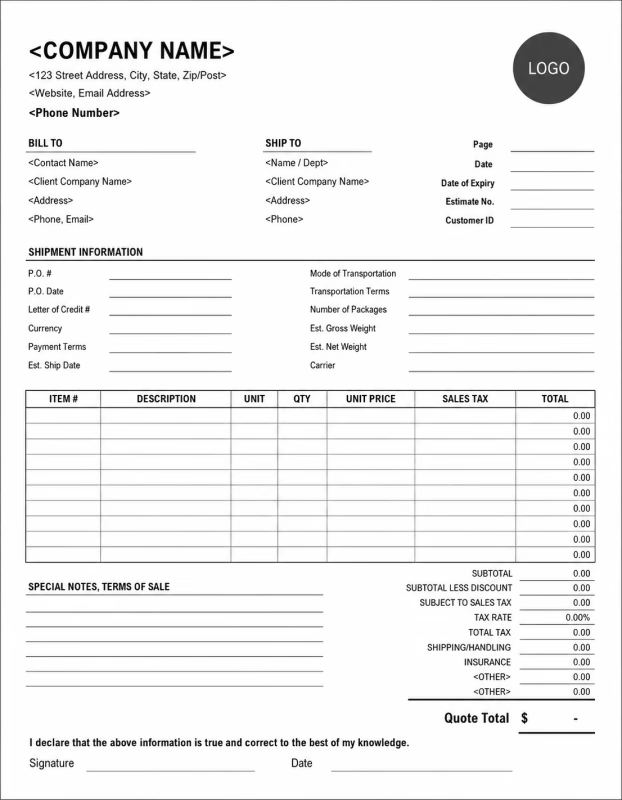
Use these templates for software companies, SaaS providers, freelance developers, app development agencies, IT service providers, technical support teams, web software businesses, and custom software consultants.
View our complete selection of invoice templates for a variety of businesses and industries.
How to Invoice for Software Services
A good software service invoice should clearly show the client details, project name, service period, software work completed, subscription fees, development charges, support costs, taxes, and payment terms.
In 5 Steps:
- Confirm the client details, software project scope, service plan, billing period, hourly rate, subscription fee, support terms, and agreed pricing before starting the work.
- Record completed software services, development tasks, bug fixes, feature updates, maintenance work, technical support, setup work, and any approved extra services.
- Track service costs such as hosting, software tools, API usage, licenses, third-party services, testing tools, cloud costs, support hours, and subcontractor fees.
- Calculate development fees, subscription charges, setup fees, maintenance costs, support hours, taxes if applicable, discounts, deposits, and the final balance due.
- Send the invoice with payment options, due date, project notes, billing period, service details, and any next-step or renewal information.
With Invoize, you can create software service invoices faster, save client details, reuse common software service items, add subscriptions and support fees, and track payments from your phone.
What to Include in a Software Service Invoice
A professional software service invoice should include the details needed to identify the client, software project, service period, work completed, charges, and payment terms.
Invoice and Client Details
-
✓
Invoice number Helps track the invoice, payment record, and software service history.
-
✓
Client name and contact details Shows who requested the software service and who is responsible for payment.
-
✓
Software provider details Shows which developer, agency, SaaS company, or software business completed the work.
-
✓
Project or account reference Connects the invoice to the correct app, software project, subscription, or client account.
-
✓
Service date or billing period Shows when the work was completed or which subscription period the invoice covers.
Software Service Details
-
✓
Service type Shows whether the charge is for development, setup, support, testing, maintenance, or consulting.
-
✓
Work description Explains the completed work, such as bug fixes, feature updates, API integration, or dashboard setup.
-
✓
Hours worked and hourly rate Shows how time-based software service fees were calculated.
-
✓
Fixed project fee Shows the agreed price when the software work is billed as a fixed project or package.
-
✓
Deliverables or access details Lists completed features, files, reports, license access, user seats, or account setup details.
Payment and Final Notes
-
✓
Extra fees and expenses Lists approved costs such as hosting, cloud usage, API fees, plugins, licenses, or testing tools.
-
✓
Discounts, deposits, or retainers Shows credits, upfront payments, or amounts already paid before the final balance.
-
✓
Total amount due Shows the final amount the client needs to pay.
-
✓
Payment due date and methods Tells the client when payment is expected and how they can pay.
-
✓
Service notes or payment terms Records support limits, renewal notes, cancellation rules, license terms, or next billing details.
Billing Scenarios for Software Service Providers
Use clear invoice labels so clients understand the type of software service, subscription charge, development cost, support fee, and final amount due.
| Scenario | Invoice line items | Best used for | How to describe it |
|---|---|---|---|
| SaaS subscription billing | Subscription plan, user seats, billing period, add-ons, tax if applicable | Monthly or yearly software access, cloud tools, dashboards, platforms, and SaaS products. | Show the plan name, billing period, number of users, add-ons, and subscription amount clearly. |
| Custom software development | Development work, feature build, testing, project milestone, delivery notes | Custom web apps, mobile apps, internal tools, dashboards, automation systems, and client software projects. | List the project name, features completed, milestone, development fee, and remaining balance. |
| Software maintenance service | Maintenance fee, updates, bug fixes, monitoring, support hours | Ongoing software care, system updates, performance checks, security patches, and monthly maintenance plans. | Show the billing period, included maintenance tasks, support hours, and recurring service fee. |
| Technical support billing | Support hours, issue resolution, troubleshooting, remote support, service notes | Client support, help desk service, troubleshooting, software training, and technical issue handling. | Show the support date, issue handled, time spent, hourly rate, and completed support notes. |
| Software setup or onboarding | Setup fee, account configuration, data import, user training, integration work | New client onboarding, SaaS setup, admin configuration, data migration, and software training. | List the setup tasks, user accounts, imported data, training session, and fixed setup charge. |
| API or integration service | API integration, testing, third-party tool setup, documentation, support | Connecting software with payment gateways, CRMs, analytics tools, email systems, or third-party platforms. | Show the integration name, systems connected, work completed, testing notes, and project fee. |
☝️ Create your first invoice in seconds.
Common Charges and Fees for Software Services
Itemize software service charges clearly so clients can see development fees, subscription costs, support hours, hosting, licenses, taxes, and any extra costs.
| Charge or service | Unit | When to use | How to show it |
|---|---|---|---|
| Software development fee | Hour, milestone, or project | Use when billing for coding, feature development, bug fixing, testing, or software implementation. | Show the task, hours or milestone, rate, and total development charge clearly. |
| SaaS subscription fee | Month, year, user, or plan | Use when charging for software access, platform usage, cloud tools, or recurring SaaS plans. | Show the plan name, billing period, user count, and subscription amount. |
| Setup or onboarding fee | Service or package | Use when setting up client accounts, configuring software, importing data, or training users. | List setup work separately when it is not included in the subscription or project fee. |
| Maintenance fee | Month, service, or package | Use for updates, monitoring, bug fixes, backups, patches, or regular software care. | Show the maintenance period, included services, and recurring amount. |
| Technical support fee | Hour, ticket, or plan | Use when billing for troubleshooting, support calls, training, issue resolution, or help desk service. | Show support hours, ticket details, or support plan amount clearly. |
| Hosting or cloud fee | Month, usage, or service | Use when hosting, cloud storage, server use, bandwidth, backups, or infrastructure costs are billed. | Show hosting or cloud costs separately from development or support fees. |
| License or user seat fee | User, seat, license, or month | Use when charging for software licenses, extra users, admin accounts, or premium access. | Show the number of licenses or seats multiplied by the rate. |
| API, plugin, or third-party tool fee | Tool, integration, or usage | Use when paid APIs, plugins, extensions, automation tools, or third-party services add cost. | List each tool or integration fee separately when billed to the client. |
| Data migration fee | Project, record, or service | Use when moving client data, importing files, cleaning records, or transferring accounts. | Show the migration work, data type, and fixed or hourly fee clearly. |
| Rush or priority support fee | Fee or percentage | Use when the client requests urgent fixes, same-day delivery, priority support, or short-deadline development. | Add a clear label so the client understands why the extra fee applies. |
| Tax | Percentage or amount | Use when tax applies to software services, subscriptions, licenses, hosting, or support fees based on local rules. | Show tax before the final total so the client can see how the balance was calculated. |
| Deposit, retainer, or previous payment | Credit | Use when the client paid before or during the software service period. | Subtract it from the invoice total and show the remaining balance due. |
Create a free account and save software service rates, subscription plans, support fees, client details, and common software invoice items once, so nothing gets retyped.
Common Software Service Invoicing Mistakes
Software service billing can include subscriptions, development tasks, support hours, hosting, licenses, integrations, deposits, and renewal terms. Missing details can confuse clients or delay payment. Avoid these common mistakes.
| Mistake | Why it causes problems | How to fix it |
|---|---|---|
| Not describing the software service clearly | The client may not understand whether the charge is for development, support, subscription access, maintenance, or setup work. | Add a simple service description for each software task, plan, or project item. |
| Leaving out the billing period | The client may not know which month, year, support period, subscription term, or project phase the invoice covers. | Add the service dates, subscription period, project phase, or billing period clearly. |
| Combining all charges in one line | The total may look unclear because the client cannot see development, hosting, licenses, support, and taxes separately. | Separate development fees, subscriptions, hosting, licenses, support, setup fees, deposits, and taxes into clear line items. |
| Not showing hours, plan, or project price | The client may question the charge if the time spent, subscription plan, or agreed project amount is not visible. | Show hours worked, hourly rate, plan name, user count, fixed project fee, or package price clearly. |
| Forgetting hosting or third-party costs | Cloud fees, API usage, plugins, licenses, or paid tools may look unexpected if not listed. | Add hosting, cloud usage, APIs, plugins, licenses, and tool costs as separate line items when billed. |
| Not recording approved extra work | Extra features, additional revisions, urgent fixes, or added integrations may be questioned later. | Show approved add-ons, extra development, extra support hours, and updated totals clearly. |
| Leaving out renewal or cancellation terms | The client may not understand when the subscription renews, how billing continues, or how to cancel future service. | Add renewal dates, cancellation terms, next billing date, and subscription notes when useful. |
| Forgetting deposits or previous payments | The final balance may look higher than expected. | Show deposits, retainers, advance payments, partial payments, or credits before the balance due. |
| Leaving out support limits or service terms | The client may not know what is included in support, maintenance, updates, revisions, or software access. | Add short notes for included support, revision limits, maintenance terms, license rules, and payment terms. |
| Not keeping invoice records | Tracking subscriptions, payments, support history, project work, licenses, and renewals becomes harder. | Keep a copy of every software service invoice for your business records. |
More Invoice Templates You May Like
Choose the invoice format that best fits your client's needs.
Professional invoice templates for teaching services, tutoring sessions, training programs, and educational billing workflows.
Professional invoice templates for translation services, document localization, interpretation work, and language service billing workflows.
Professional invoice templates for transportation services, passenger travel, logistics operations, and delivery billing workflows.
Software Service Invoice FAQs
Line items for software development, bug fixes, maintenance, SaaS setup, integrations, support hours, testing, licensing, deposits, and final payment. Built for software developers, SaaS providers, IT agencies, freelancers, and software service companies using the Software Service Invoice Template.
How should I show software development charges on an invoice?
List the development work by task, milestone, or hourly rate. Example: “Custom dashboard development: 12 hours × $60/hr = $720” or “User login module setup: Fixed fee: $350.” This helps the client understand what software work was completed.
What project details should be included on a software service invoice?
Include the client name, project name, billing period, service dates, invoice number, and a short description of the software service. Example: “Project: CRM web app updates, billing period: June 1–June 15.” This connects the invoice to the correct software project.
How do I invoice for bug fixes or technical support?
List each fix or support task separately with the time spent and rate. Example: “Fix checkout page error: 2 hours × $55/hr = $110” or “Resolve API connection issue: $150.” This makes technical work easier for the client to review.
Should software maintenance be listed separately?
Yes. Maintenance should be shown as its own line item, especially for recurring work. Example: “Monthly software maintenance: Security checks, updates, and minor fixes: $300.” This keeps ongoing support separate from new development work.
Can I include software setup or installation fees?
Yes. Setup, onboarding, installation, configuration, or account setup should be listed separately if charged. Example: “SaaS account setup and configuration: $250” or “Software installation and testing: $180.” This explains the work needed before the software is ready to use.
How should I bill for integrations or API work?
List the integration type, system connected, and development charge clearly. Example: “Payment gateway integration: Stripe setup and testing: $450” or “CRM API integration: 6 hours × $65/hr = $390.” This helps the client see which systems were connected.
How do I show deposits or milestone payments?
Show the full project amount, deposit received, current milestone charge, and remaining balance. Example: “Software project total: $3,000,” “Deposit paid: $900,” “Milestone 1 completed: $1,200,” and “Remaining balance: $900.” This keeps project payments clear.
What payment terms should a software service invoice include?
Include the due date, accepted payment methods, milestone terms, revision policy, and extra work rules. Example: “Payment due within 7 days. Extra features, added revisions, third-party tools, or scope changes may require an updated invoice.”
Used by Businesses Around the World
From freelancers to growing companies, Invoize helps businesses create professional invoices, manage billing, and get paid faster.







Create and Send Professional Invoices in Seconds
Invoize helps freelancers and businesses create, manage, and send invoices easily
from anywhere without complicated accounting software.
- Smart Invoice Management
- Expense & Payment Tracking
- Secure Local Data Storage






★★★★★
Trusted by 1400+ Business Owners